


It can be, and it comes down to how the tool is built. Check three things before you paste anything private: whether you need an account, where the speech recognition runs, and where your script and recording end up. All three take about two minutes to check, and you don't need to trust anyone's word.
What can go wrong when you paste a script into a web tool
Most scripts aren't secret. But some are: a product launch that hasn't been announced, a results update for investors, an internal message about a restructure, a legal or HR training video. For those, it's worth knowing what a teleprompter does with your words.
An online teleprompter can expose a script in a handful of ways. None of them are unusual. They're just how a lot of web apps are built.
- Your script is saved to an account. If you sign in, the script usually lives on the company's servers so it's there next time. That means it's stored, backed up, and readable by anyone with access to that database.
- Your voice goes to a speech service. Voice-following needs speech recognition. If that runs "in the cloud", your microphone audio is streamed to a server, often a third-party one, for every word you say.
- Your recording is uploaded. Some tools record in the browser and then upload the video to be processed, stored or shared from a link.
- Tracking scripts run on the editor page. Analytics tools count visits. Session-replay tools go further and record what happens on the page, which can include text you type or paste.
- Share links carry the script. A link that opens your script for someone else has to get the text from somewhere, usually a server.
- Your Google Doc has to be public. Tools that load a script from Google Docs often need it set to "Anyone with the link". Anyone who gets that link can read it.
- Text stays behind in the browser. Even a tool with no server can keep your last script in the browser so it's there when you come back. On a shared computer, the next person sees it too.
So "is it safe?" really means "which of these does this tool do?". You can find out.
A checklist for any online teleprompter
Run these five questions against any tool before you paste in something confidential.
| Question | Where to look | A good answer |
|---|---|---|
| Do I need an account? | The first screen. Is there a sign-in wall before you can paste? | No account. Nothing to store your script against. |
| Where does speech recognition run? | The privacy page or FAQ. Look for "on device" or "in the cloud". | On your device, with a model you download once. |
| Where does the recording go? | What happens when you press Stop. A save dialog, or an upload bar? | Saved to a folder you choose. No upload. |
| What does the network show while I paste and record? | Your browser's DevTools, Network tab (below). | Only requests to the tool's own site, and none carrying your script or audio. |
| What's left in the browser afterwards? | Clear or delete the script, then reload the page. | Your script is gone once you've cleared it. |
If a tool fails the first three, your script and your voice are on someone else's computer. That can still be fine, depending on who they are and what you're recording. But you'll be making that choice knowingly.
How to check the network requests yourself
A privacy page tells you what a company says it does. The Network tab shows you what the page actually does, and it takes about a minute in Chrome, Edge or Brave.
- Open the teleprompter.
- Press F12 (or Ctrl+Shift+I) and click the Network tab.
- Paste your script, start recording, and read a few lines out loud.
- Look down the list of requests at the Domain column (right-click the column headers to add it if you can't see it).
You're looking for two things. Which websites the page is talking to, and whether any request keeps firing while you speak. A steady stream of requests during a take is often your audio going out.
To see the take on its own, press DevTools' clear button (the circle with a line through it, top left of the Network tab) once you've started recording. The list empties, so anything that shows up after that was sent while you were talking.
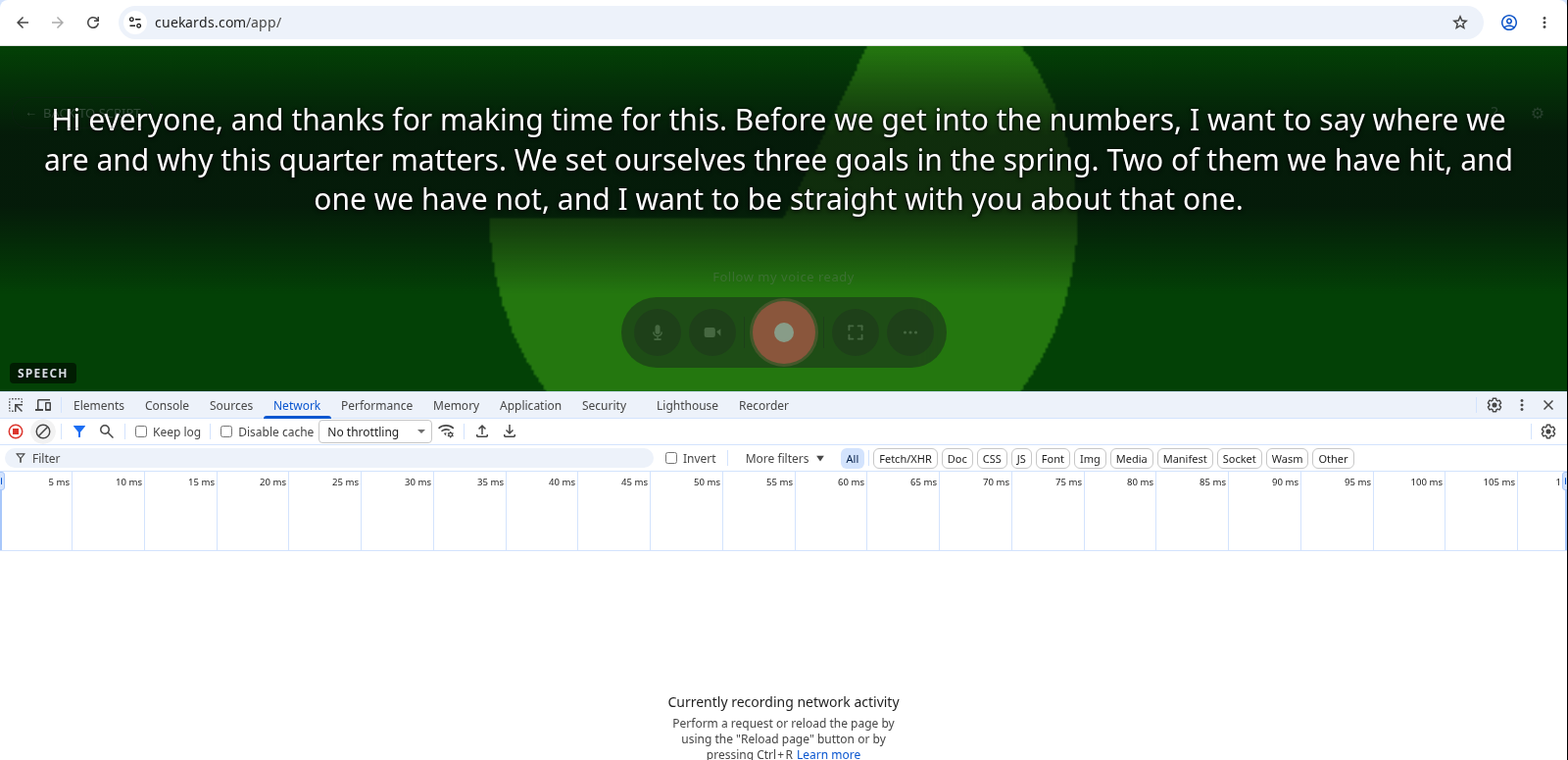
Tested on 11 November 2026 in Chrome 157: 40 seconds of reading into cuekards with Follow my voice on, and not one request.
How cuekards handles this
Cuekards was built so the answer to most of that checklist is "nothing leaves your computer". Here's what that means in practice, including the parts that do touch a server.
No account. There's no sign-in, and the app page sets no cookies. There's nowhere on our side to keep your script, because there's no account to keep it against.
A pasted script isn't sent anywhere. When you paste a script, it's held in your browser. Cuekards keeps your last script there so it's waiting when you come back, and pressing Clear removes it.
Follow my voice runs in your browser. The speech model is a one-time download of about 64 MB from cuekards.com, stored in your browser for next time. After that, recognition happens on your machine. Your audio isn't streamed anywhere, and nor are the words it recognises.
Your recording stays on your computer. While you record, the take is written to your browser's private storage on your own disk. When you press Stop, you choose where to save the file. There's no upload step, and nothing is stored on our side.
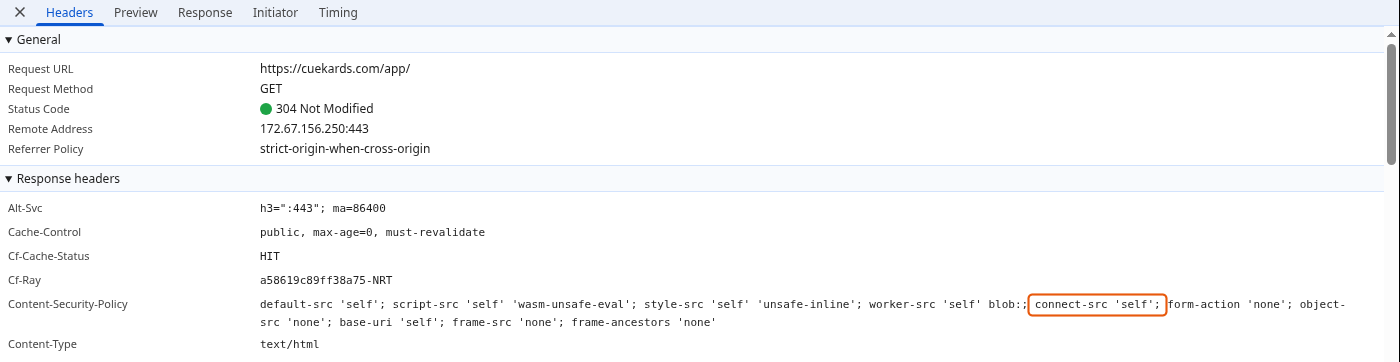
The app page can only talk to cuekards.com. This is the part you can check without taking our word for it. The page at cuekards.com/app comes with a security rule, called a Content Security Policy, that tells your browser it may only send data to cuekards.com itself. Even if something in the page tried to send your script to another website, the browser would block it.
To see it, open DevTools on the app, go to Network, reload, click the first request, and find Content-Security-Policy under Response headers. The part that matters is connect-src 'self'.
Google Docs are the one exception. Browsers can't read a Google Doc directly, so a doc you load passes through a small cuekards relay that fetches it and hands it straight back without keeping it. The doc also has to be shared as "Anyone with the link".
Analytics stay off the app. The home page and this blog count visits with Google Analytics. The app page, where your script lives, has no analytics at all.
The full setup, from loading a script to saving your take, is on how it works.
When a browser teleprompter still isn't the right call
A tool that keeps everything local only protects what happens inside that tool. Some risks sit outside it.
- A managed work laptop. Company devices often run monitoring or data-loss software that can see your screen, your clipboard or your files. No teleprompter setting changes that. If the script is sensitive enough to worry about, check what's installed.
- Screen recording running in the background. Meeting apps, screen recorders and some browser extensions can capture the prompter window along with everything else.
- A Google Doc for a genuinely confidential script. "Anyone with the link" means exactly that. For anything under NDA, paste the script instead and keep the doc private.
- A shared computer. Clear the script when you finish, and delete any takes you've saved to that machine.

Does an online teleprompter store my script?
Some do, and some don't. Tools with an account usually store it on their servers. Tools without one may still keep your last script in your browser. In cuekards, a pasted script stays in your browser only, and Clear removes it.
Is my voice uploaded when I use a voice-following teleprompter?
It depends on where the speech recognition runs. Cloud recognition uploads your audio as you speak. Cuekards' Follow my voice runs on your machine with a downloaded model, so your audio stays on your computer.
Can other people see a script I load from Google Docs?
Anyone with the link can, because the doc has to be shared as "Anyone with the link" for a teleprompter to load it. For confidential scripts, paste the text in instead.
Is it safe to use an online teleprompter on a work computer?
The teleprompter can be, if it keeps everything local. But work computers often run monitoring software that sees your screen and clipboard whatever app you use. If you're unsure, check your company's policy before you paste anything sensitive.
Does cuekards use cookies?
Not on the app page. The home page and the blog use Google Analytics, which sets a cookie, and visitors in the UK and EEA are asked first.
The best way to trust a privacy claim is to test it. Open cuekards, open DevTools on the Network tab, paste a paragraph, tick Follow my voice, and record ten seconds. Then read down the Domain column and check every row yourself.