
Sound natural on camera, without memorising a word
A free teleprompter that follows your voice, so the next line appears exactly when you reach it. Read at your own pace and look straight down the lens.
Desktop only. cuekards fills the monitor beside your camera lens, records a take of any length, and saves the file where you choose. A phone or tablet can do none of the three. Send yourself the link for the machine you film on, and read on here.
- No sign-up
- No watermark
- Never leaves your device
- Runs in your browser
Reading a script shouldn't look like reading a script
Your eyes drift. Your pace goes flat. You shoot take after take trying to sound like you're not reading.
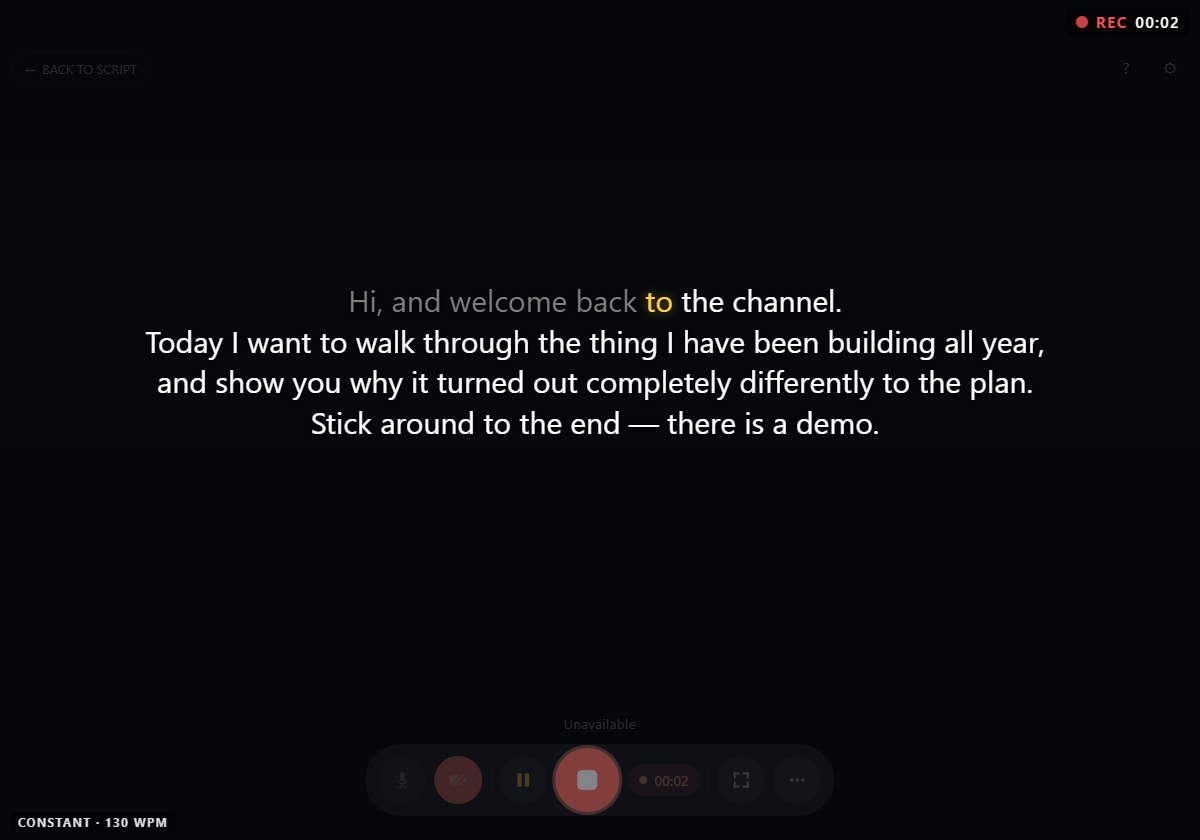
Cuekards fixes the pace problem. It listens as you speak and moves your script forward line by line, so the words you want next are always right where you're looking.
Why it beats a scrolling teleprompter
Most teleprompters scroll on a timer. You set a speed, then spend the whole take trying to match it. Speak too slow and the text runs ahead of you. Pause to think and it keeps going without you.
Cuekards follows your voice instead. Stumble on a line and repeat it, the script waits. Speed up, it speeds up. Take a breath mid-sentence, nothing moves until you do.
Free, with no catch
No account, no watermark, no cap on how many takes you record or how long they run.
Private by design
Your video is written straight to your own machine. Our servers never receive it.
Nothing to install
It runs in the browser. The only download is a one-time voice model, and even that's optional.
Who it's for

YouTubers & vloggers
Hit your lines without memorising a whole script.
Follow my voice

Course creators
Record lesson after lesson at a natural, consistent pace.
no length cap

Founders & solo marketers
Shoot a talking-head in one sitting. No crew, no autocue rental.
records camera + mic

Anyone who hates their own retakes
Fewer flubs, less editing later.
fixed reading position
How it works
-
step 01
Load your script
Paste it in, or pull it straight from a Google Doc. Keep editing the doc while you film and it refreshes live.
-
step 02
Turn on Follow my voice
A one-time download of a small English voice model (about 64.1 MB), kept in your browser for next time.
-
step 03
Hit record and just talk
Read at whatever pace feels natural. The next line appears as you reach it.
-
step 04
Press stop to save
You choose where the file lands on your computer.
Full walkthrough at how it works.
What you'll need
Use a recent desktop Chrome, Edge, Brave or another Chromium-based browser — version 120 or newer.
Want to record using your phone?
Mobile isn't supported yet. It's on the list.
Your recordings stay yours
Cuekards never sees your video. While you record, each take is written to your browser's private storage on your own machine, one second at a time. When you press stop, you pick where to save it. Nothing is uploaded, nothing is stored on our side, nothing is sent anywhere.
Capture Video
Uses your webcam
All captured video is written straight to your device as you go. You choose where to save it when you end the take.
Capture Voice
Uses your mic
To enable follow-your-voice, you need to install a one-time 64.1 MB English model to your device.
Stable Recording
Safe from crashes
Your recording is saved every second. So in case of a crash, you won't lose the whole take.
FAQ
How long can I record?
As long as your storage allows. Cuekards writes straight to disk as you go, so free space is the only real limit. For anything long, we'd still suggest breaking it into takes of around 10 minutes each.
Is Follow my voice English only?
For now, yes. The model that powers it is English. You can still record in any other language, the script just scrolls at a fixed speed instead of following you.
Can I record in 4K?
Yes, if your webcam and computer support it. Cuekards saves exactly what your browser captured, with no re-encoding, so the quality is whatever your camera gives.
Do you store my recordings?
No. Your video lives on your machine only, from the first second to the last. More on this in your recordings stay yours.
Is it really free?
Yes. The browser version is free: no account, no watermark, and no limit on the number or length of your takes.
Does it work with Google Docs?
Yes. Load your script from a public Google Doc, then keep editing the doc while you film. Your changes refresh in Cuekards automatically.
Do I have to download anything?
Only if you want Follow my voice. That needs a one-time English voice model (around 64.1 MB), which stays in your browser for future takes. Skip it and you can still record, just without the voice-following.
Does it work on a phone?
Not yet. Cuekards is desktop-only for the moment.
Is there a Windows app?
Not yet. I might build one later.
Found a bug, or want a feature?
Email me at alex@halfborg.com. It reaches one person, and I read all of it.
From the blog
Ready to record?
Open cuekards.com, paste your script, and start talking.