

Most of it isn't your delivery. Five things make you sound like you're reading, and three of them are prompter settings you can change in under a minute: where the text sits, how fast it moves, and how big it is. Fix those three first, then worry about the other two.
Why you sound like you're reading
Sounding like you're reading is mostly a layout and pacing problem: the text sits too far from your lens, moves at a pace that isn't yours, or is set too small and too wide to take in at a glance.
What a viewer actually notices is your eyes, your rhythm and your breath. Each of those traces back to something specific.
| What people notice | What's actually happening | Which fix |
|---|---|---|
| Your eyes are looking somewhere else | The text is far enough from the lens that your eyeline shifts to read it | Reading position |
| Your eyes flick side to side | Each line is long enough that you have to sweep across it | Type size |
| You lean in, or you squint | The type is too small to read from where you're sitting | Type size |
| Every sentence comes out at the same pace | You're matching a scroll speed instead of setting one | Your pace |
| You rush the ends of sentences | The text is moving away from you and you're catching up | Your pace |
| You trip over the same word in every take | That word is written, not spoken | Rewrite it aloud |
| You stiffen up, and take four is the good one | You're saying it for the first time on camera | One read-through first |
The three that are settings
1. The text sits too far from your lens
Your camera is at the top of your screen. Your script, by default, sits about a third of the way down it. That gap is what a viewer reads as "not looking at me".
You can close it three ways: move the reading line up towards the top of the screen, put the prompter on whichever monitor your camera is on, and sit a little further back. Distance helps because it shrinks the angle. The same gap seen from further away is a smaller eye movement.
2. The pace is the machine's, not yours
A timed scroll picks a speed before you've opened your mouth. Then you spend the whole take serving it. Slow down to land a point and the text walks off without you. Stop to think and it keeps going.
What that does to your voice is the real cost. You end up delivering at one steady rate, sentence after sentence, because the scroll is one steady rate. A lot of flat delivery is just someone keeping up.
Two ways out. Rehearse against a fixed speed until it's genuinely your speed, or use a prompter that follows your voice, so the question of pace never comes up.
3. The type is too small and the lines are too long
These are one problem, not two. Small type fits more words on a line, and a long line means your eyes travel across it, which is visible on camera. Big type fits fewer words on a line, and a short line is something you take in with one glance.
So bigger is the fix for both. Push the size up until you're reading three or four words at a time instead of scanning a sentence. If the lines are still long at that size, make the prompter window narrower — a narrow window forces a short line however you set the type.
The two that are you
4. The script is written for the eye, not the ear
A sentence that reads fine can be unsayable. Thirty-five words with two clauses stacked in the middle looks normal on a page. Out loud you run out of breath and your voice falls off the end of it.
So read the whole script out loud once, before you go anywhere near a camera. Everywhere you stumble, rewrite. Cut the sentence in half, put the contractions back, and swap any word you wouldn't use talking to a friend. "Utilise" becomes "use".
5. You're saying it for the first time on camera
The first read is always the stiffest, because you're doing two things at once: finding out what the sentence says, and performing it. Take four sounds better because by then you're only doing the second one.
So do the finding out first. Read the script through once with the prompter running and the camera off. You're not rehearsing to memorise it, just to stop being surprised by it.
And chunk the shoot. For anything long, record it in takes of ten minutes at most. Shorter takes mean a stumble near the end costs you a minute instead of nine.
How cuekards handles this
Cuekards runs in a desktop browser, and every control below is on the prompter itself, so you can set it while watching your own face.
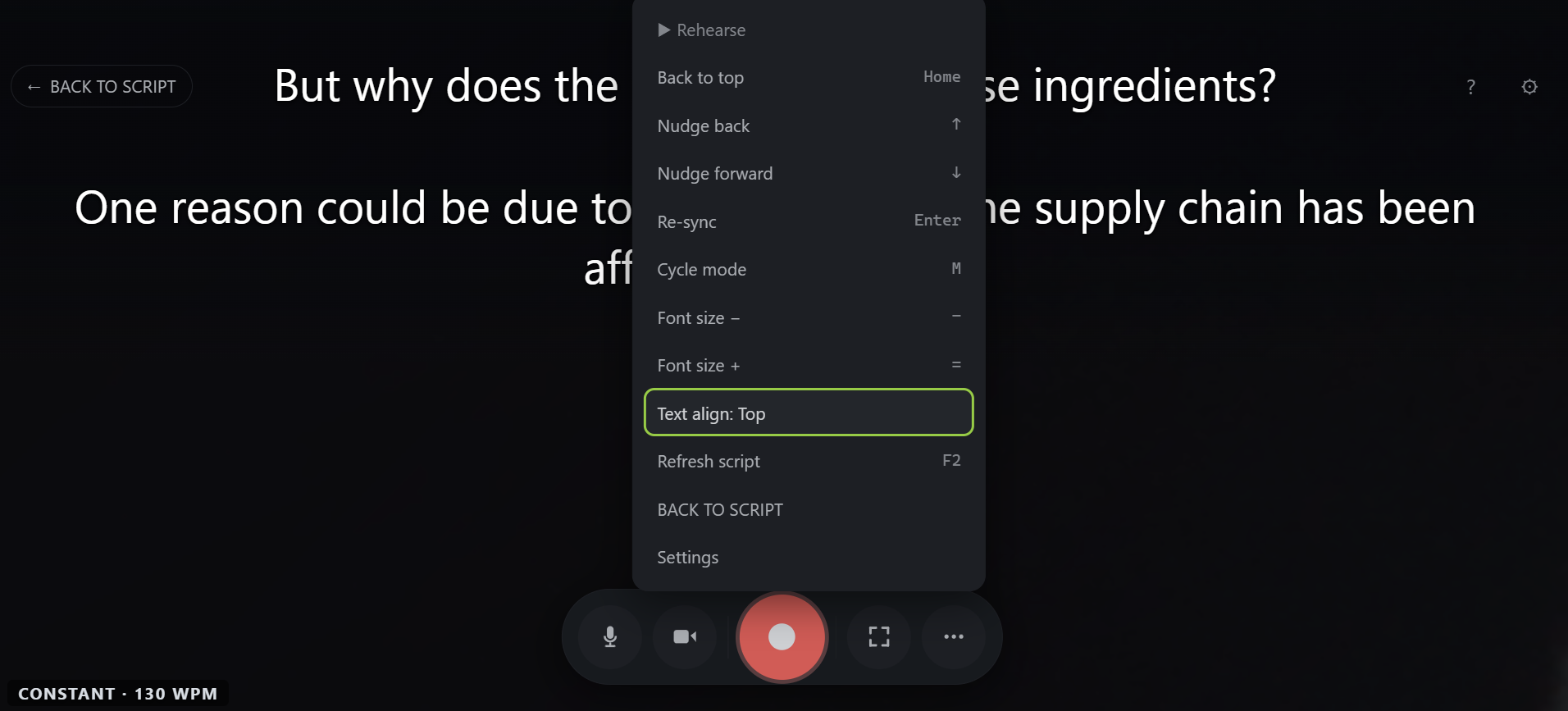
The reading line moves, in three steps. The ⋯ menu has one Text align item that cycles through Top, Middle and Bottom. It starts at Middle, about a third of the way down the screen. Top is what you want if your camera sits above your screen, which it usually does.
That's a rig setting, not a taste one. Where the reading line belongs depends on where your camera is mounted. So cuekards leaves it alone when you reset everything else, and leaves it out of a settings link you share. Their camera isn't where yours is.
Font size changes while you watch. The same ⋯ menu has Font size − and Font size +, on the − and = keys. They move the prompter in front of you as you press them, mid-take included, so you can set the size while looking at yourself rather than guessing.
Those presses don't save anything. The size starts at 30 px and runs from 16 to 96, and the slider in Settings sets what a new session starts from. To keep the size you just dialled in, use "Save the prompter as it is".
Line length comes from the window. There's no line-width setting in cuekards. The script fills the width of the window, so the two things that shorten a line are a bigger font and a narrower window. Narrow the browser window until only a few words fit on a line and you've built yourself a column.
The backdrop is yours to set. A wash sits behind the text over your camera preview, at 55% to start, and you can take it anywhere from nothing to 90%. The band around the reading line is brighter than the rest, so the line you're on is the easiest thing on screen to find.
Follow my voice takes the pace question away. Tick Follow my voice in the green room and the script moves when you move, at whatever speed you're talking. It understands English only for now. Without it, cuekards scrolls at a constant speed instead: 130 words per minute to start, and anything from 40 to 400.
Rehearse runs the prompter with nothing recording. It's in the same ⋯ menu. The script tracks your voice, no video is captured and no file is saved. That's the fix for cause five, and it costs you one read-through.
Leave yourself breath marks. Anything in [square brackets], and any line starting with #, shows on screen but is never tracked. So [breath], [slow down here] or # this is the punchline can sit in the script without confusing the matcher.
Recording starts on a count of three. Those three seconds aren't adjustable. The constant-speed scroll doesn't run during them, so the script isn't already moving by the time you start talking.
The limits, up front. Follow my voice is English only. Cuekards runs on desktop, in Chrome, Edge, Brave or another Chromium-based browser (version 120 or newer), and not on phones yet. The reading line has three positions rather than a slider, and there's no setting for line width.
The mechanism behind Follow my voice is on how it works.
For the settings in this post, one pass is enough to feel the difference. Open cuekards, paste a paragraph, set Text align to Top, push the font size up until three or four words fill a line, then hit Rehearse and read it with the camera off. The browser version is free, and there's no account to create.
How do I stop sounding monotone on camera?
Check the scroll before you check yourself. A flat voice is often someone matching a constant speed, and a constant speed is flat by definition. Read the same paragraph twice, once against a fixed scroll and once with the prompter following your voice, then listen back to both.
Is it obvious when someone is using a teleprompter?
Only when the setup is wrong. What gives it away is the eyeline and the rhythm: eyes parked away from the lens, or every sentence arriving at the same pace. Get the text close to the camera and set your own pace and it stops being something a viewer can pick out.
Can I practise with a teleprompter without recording?
In cuekards, yes. Rehearse mode runs your script and follows your voice with nothing being recorded, so you can do a read-through, fix the words you trip over, and then record once.
Is reading from a script cheating?
No. Most of the talking-head video you watch is scripted, including the parts that sound off the cuff. A script is how you say the thing you meant to say in the time you've got. What people react to is a delivery that sounds read, and that's what the five fixes above are for.
What if I want the text closer to the lens than the top of the screen?
Make the browser window smaller and drag it up under the camera, then set Text align to Top. A small window high on the screen is as close as you can get the reading line to the lens without a mirror rig.