


A fixed-scroll teleprompter keeps moving while you're silent. A two-second pause at 150 words per minute leaves the script five words ahead of you, and a ten-second pause leaves it 25 words ahead. You have two fixes: pause the scroll every time you pause, or use a voice-following teleprompter, which holds still for as long as you're quiet.
There was always someone holding the cards
For most of television's history, when a presenter was on screen and talking, they were reading off cue cards. As they read off each sentence, a person would drop that card and show the next sentence.
Actors used cue cards as early as the 1930s, and they spread through TV in 1949, when Barney McNulty started writing out the comedian Ed Wynn's lines on large sheets of card. McNulty went on to hold cards for Bob Hope for decades. Saturday Night Live and the late-night talk shows still use them, because their scripts change right up to air.
The card holder stands beside the camera and listens to the performer. As a line ends, the next card comes up. Stop for a laugh and the cards stop too.
The teleprompter kept that arrangement. The first one, used on a CBS soap opera in December 1950, was a paper scroll that a technician near the camera wound on as the actor read. News studios later swapped the paper for a screen. But someone still listens: an operator or the presenter with a hand control, matching the reader line by line.
And now that everyone wants to be a presenter (but doesn't have a friend to listen and hold cue cards for them), they turn to a scrolling teleprompter that runs at a fixed speed. But that doesn't work.
Why a timed scroll runs away from you
A timed scroll moves at a set speed. It has no idea whether you're talking. So every second you're quiet, the script carries on without you. It's like the song lyrics appearing in a karaoke session. They will keep going whether you can keep up or not.
So, if you pause, the script keeps going, and you need to catch up. That makes your read sound terrible.
Pauses are actually important
Pauses make your delivery sound natural. But there are other reasons to pause, such as:
| Pause | Typical length | What a timed scroll does |
|---|---|---|
| A breath, or a beat to land a point | 1 to 2 seconds | Moves a few words on. You rush the next line to catch up. |
| Thinking, or losing a word | 2 to 5 seconds | Moves the sentence you're looking for up and out of your eyeline. |
| A stumble and a restart | 2 to 4 seconds, plus the redo | Keeps going while you go back, so you finish the redo a line or two behind. |
| A demo, or picking something up | 10 to 60 seconds | Scrolls a paragraph or more past you. |
| An interruption (doorbell, dog, delivery) | A minute or more | Carries on until you stop it, often to the end of the script. |
The first two happen dozens of times in every take, and you can't stop the scroll for each one. The last three are rarer, and long enough that you have to do something about them.
How to pause with a timed-scroll prompter
You CAN live with a timed scroll. It just takes a bit of planning.
- Stop the scroll for anything over a couple of seconds. On many prompters that's the spacebar. Make it a habit before a pause, not after you notice the text has moved.
- Put demos at the end of a paragraph. Finish the paragraph, stop the scroll, do the demo, start again. Or end the take there and record the next part as a new one.
- Restart from the top of the paragraph when you've lost your place. Hunting for the exact word mid-sentence usually costs more than going back a few lines and reading them again.
- Set the speed a little under your natural pace. Small beats then give you time to breathe instead of putting you behind. Too slow and you'll start to drag, so time yourself first. Pace is one of the five causes in how to read a teleprompter without sounding like you're reading.
But the best solution by far is to bring the "listener" back. A voice-following teleprompter listens and moves with you, the way the card holder always did.
What "holds position" looks like
A voice-following teleprompter moves the script only when it hears you read it. So a pause doesn't need a key. When you stop talking, nothing new is heard, and nothing moves.
That makes two things separate that a timed scroll forces together: holding the prompter, and pausing the recording. On a voice-following prompter, you never pause the prompter. You pause the recording only when you want the gap out of the file, for a long demo or a doorbell.
There's one more kind of pause it has to handle: the stumble. When you go back and redo a line, a simple matcher can glue the words before and after the pause together and get lost. How voice-following works explains why a pause before the restart fixes that.
How cuekards handles this
Silence never moves the script. With Follow my voice on, cuekards holds your place for as long as you're quiet. Three seconds or five minutes: there's no time limit, and your place is still there when you start talking again.
A pause before a redo lets it follow you back. About a second of silence tells cuekards you've finished a phrase. Go back to the start of the sentence and it moves back with you, up to about a sentence behind. If you've gone further back than that, press Enter to re-sync. It looks about four times further in each direction.
Filler is fine. A lone "um" or "so" doesn't move anything. A few words that aren't in the script, such as "hang on, where was I", show an OFF-SCRIPT label. It stays up until you're back on a line it can see. That's cuekards telling you it's holding, not an error.
Pausing the take is a separate thing. Press Space, or the Pause button on the control bar, and the recording stops. The badge in the top-right corner turns amber and reads PAUSED, with the time frozen. When you resume, the take carries on in the same file, so a long pause becomes a jump cut rather than a second file to stitch together.
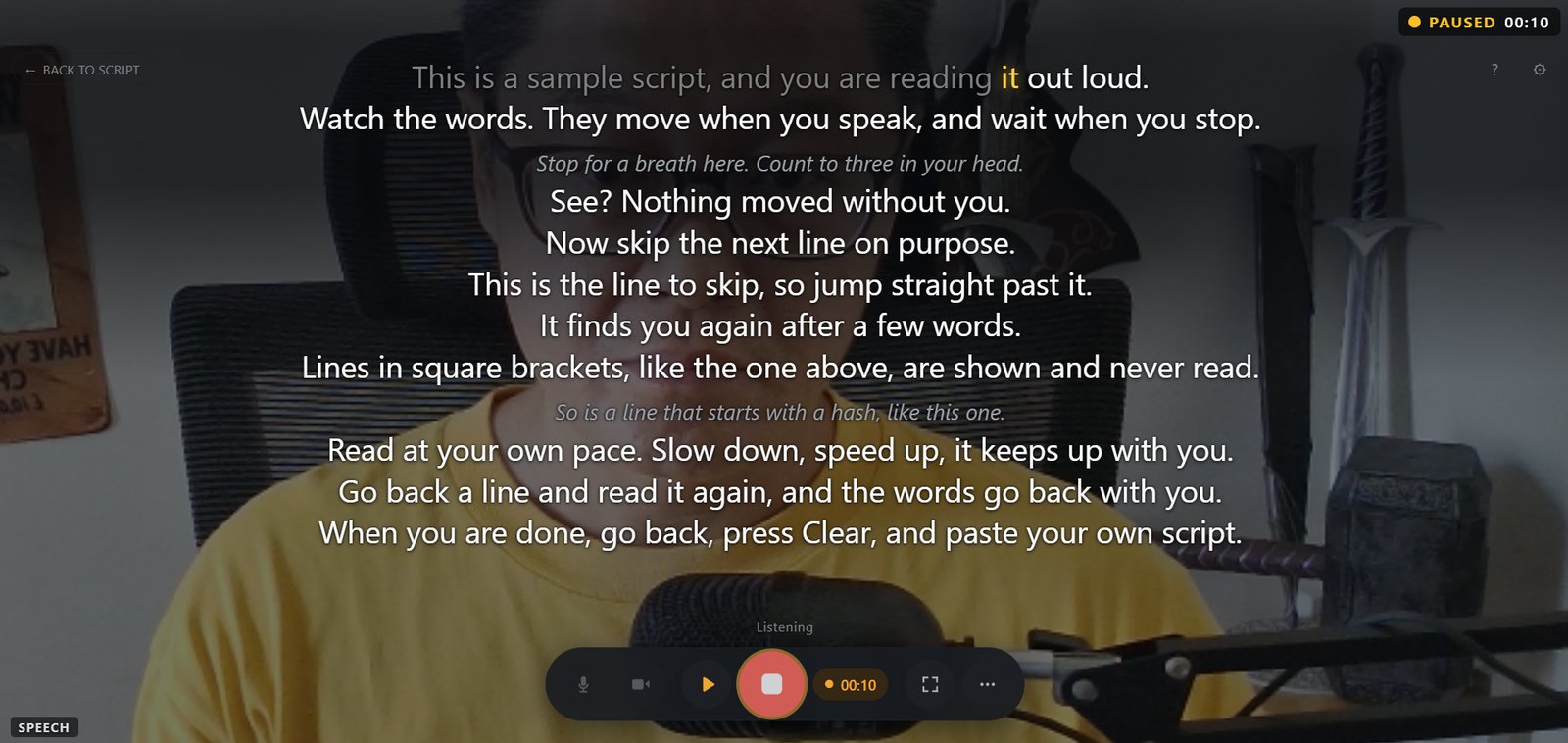
You can fix your place while paused. The Up and Down arrows step one line, Home goes back to the top, and Enter re-syncs, all while the take is paused. So if the demo ran long and you want to pick up a paragraph later, set the place first, then resume.
With Follow my voice off, the scroll runs at a constant speed. It moves only while you're recording, stops when you pause the take, and carries on from the same word when you resume. There's no countdown, so press Resume and then start talking.
No key holds the scroll while you keep recording, and a [pause] note in the script doesn't stop it. Notes take no time at all.
Hands busy? Say it. With voice commands turned on (Settings → Voice commands, off by default), "cuekards pause" and "cuekards resume" pause and resume the take. The words "cuekards pause" end up in your recording, so trim them in the edit.
The limits. Follow my voice is English only for now, so a script in another language uses the constant-speed scroll. Cuekards runs on desktop, in Chrome, Edge, Brave or another Chromium-based browser (version 120 or newer). It doesn't work on phones yet.
The full setup is on how it works.

Why does my teleprompter keep scrolling when I stop talking?
Because it's on a timed scroll. It moves at a set speed whether you're talking or not. Stop the scroll whenever you pause, or switch to a voice-following teleprompter, which only moves when it hears you read the script.
How long can I pause with a voice-following teleprompter?
As long as you like. In cuekards, Follow my voice keeps your place through any length of silence and picks up when you start reading again.
Does pausing the recording make a separate file?
Not in cuekards. A paused take carries on in the same file when you resume, and the paused time is left out, so you get one continuous video with a cut where you stopped.
Can I pause a teleprompter hands-free?
On a voice-following teleprompter you don't need to. It holds still when you stop talking. To pause the recording itself without touching the keyboard, cuekards has voice commands: say "cuekards pause", then "cuekards resume". Other prompters often use a foot pedal or a remote.
What's the keyboard shortcut to pause a teleprompter?
It's often the spacebar, and it is in cuekards. Check your prompter's own settings to be sure. In cuekards you can change any shortcut in Settings.
The quickest way to see this is to try it. Open cuekards, paste a script, tick Follow my voice, and choose Rehearse from the ⋯ menu. It follows along without recording. Read a paragraph, stop mid-sentence for ten seconds, then carry on, and watch the reading line stay where you left it.